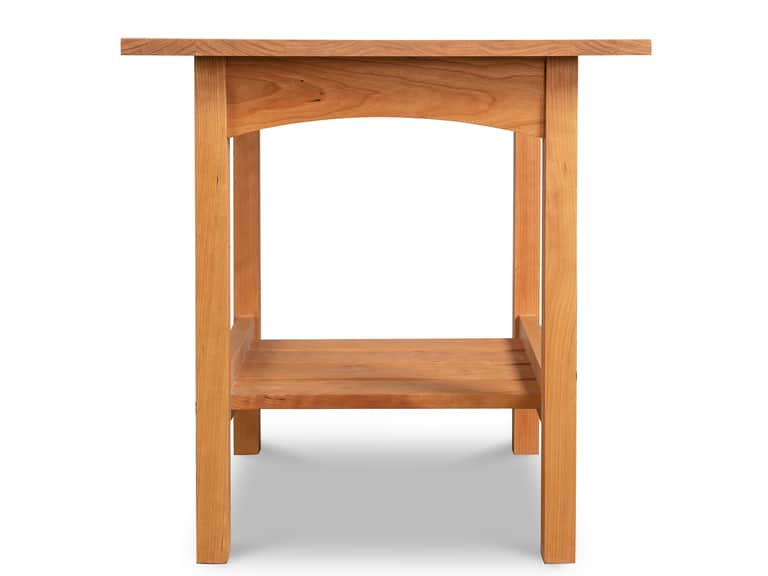
Burlington Shaker Lamp Table
Handmade to order in Vermont from solid wood, this Shaker lamp table offers lasting durability, a timeless look, and a warm grain enhanced by eco-friendly oil—simple, sturdy, and versatile for any room.
A practical guide to creating an ergonomic, adjustable home office. Learn how to combine height-adjustable desks, ergonomic chairs, monitor arms, and lighting to support posture, productivity, and well-being.
In an era where work horas are increasingly fluid, the physical space that houses our daily tasks must adapt with equal agility. An ergonomic workstation is not a single device, but a system—a constellation of components that move in concert to honor the human body. Like a landscape that shifts with the seasons, a well-designed desk, chair, monitor arm, and lighting scheme can be reconfigured to fit different tasks, different tasks of different people, and different times of day.
Adjustability is the thread that ties the elements of a modern workstation into a coherent whole. A height-adjustable desk invites you into a dialogue with your posture; an ergonomic chair sustains a dynamic, comfortable spine; monitor arms align screens to eye level with minimal strain; and intelligent lighting sets the tone for focus and reduces glare. Together, they form a habitat that respects anatomy, reduces fatigue, and sustains productivity across long hours.
Beyond comfort, this approach embraces evidence-based design. Ergonomics is not a fashion; it is a science of fit—calibrating ranges of motion, angles, and heights that accommodate diverse body shapes and tasks. The goal is a setup that can be tuned, as a musician tunes an instrument, to produce sustainable efficiency and wellbeing.
The architecture of a flexible workspace rests on four pillars: a height-adjustable desk, an ergonomic chair, a monitor arm system, and intelligent lighting. Each element is not a lone hero but a collaborator that adapts to shifting tasks, body sizes, and environmental constraints.
1) Height-Adjustable Desk: The podium from which every task is conducted. A sit-stand desk supports posture variation, engages core musculature, and mitigates static loading. The ideal desk offers a broad uplift range, smooth motor operation, and quiet performance to avoid interrupting deep focus sessions. When choosing a desk, consider the footprint of your space, cable management, and the ease with which you can return to seated work when tasks demand.
2) Ergonomic Chair: The chair is the base of your posture. An adjustable chair should accommodate lumbar support, seat depth, arm height, and recline while maintaining a natural alignment of hips and knees. The chair’s geometry should encourage dynamic movement—micro-adjustments that occur as you shift between writing, drafting, and screen-glancing tasks.
3) Monitor Arms: The visual axis of the workstation. A monitor arm system enables precise height and distance adjustments, reducing neck flexion and lateral leaning. The right arm setup can consolidate multiple screens into a clean, cohesive display, encouraging proper line-of-sight alignment with minimal eye strain.
4) Lighting: The ambiance and task lighting matter as much as the furniture. Layered lighting—ambient, task, and accent—helps control glare, reduces eye fatigue, and shapes mood. Adjustable luminaires that can be angled toward the work surface without creating reflections on the screen are essential in a balanced setup.
The idea of ergonomic and adaptable environments has been shaped by thinkers and designers spanning centuries. Three figures, from different eras, illuminate how we think about workspaces and the body in motion:
Though best known for art and science, da Vinci’s notebooks reveal a mind attuned to the relationship between the body and space. His exploration of anatomy, proportion, and mechanical leverage prefigures modern ergonomics: the idea that tools and surfaces should be scaled to human capability. In an era of crafts and artisanship, his insistence on observation and proportion informs a design ethic—one that treats objects as extensions of the body, crafted to reduce strain and improve efficiency.
The Finnish designer’s work bridged form and function with a humanist sensibility. His chairs, desks, and lighting embraced natural materials and gentle ergonomics, threading comfort with aesthetic clarity. Aalto’s approach—designing for real living conditions, with attention to posture and everyday use—resonates in today’s adjustable setups where furniture is not only a statement piece but a facilitator of wellbeing and productivity.
A modern voice in workplace wellness, Wasson’s guidance centers on data-informed adjustments that improve posture, reduce repetitive strain, and support sustained performance. Her emphasis on gradual, measurable changes mirrors today’s practical approach: begin with assess-and-adjust cycles, then calibrate desks, chairs, and lighting to align with evidence-based ranges for chair height, desk height, and monitor alignment. In other words, adaptivity, not hype, defines a healthy workspace.
In assembling a flexible workstation, the choice of materials and mechanisms matters as much as the layout. Smooth, quiet motors in a height-adjustable desk reduce disruption; robust aluminum frames provide stability for larger configurations; and cable management systems keep workflows uncluttered. When integrating lighting and monitor arms, the emphasis should be on durability, ease of use, and compatibility with your existing tools and devices.
One practical strategy is to layer your gear: start with a solid base—an adjustable desk and a supportive chair. Add a monitor arm system with independent height and reach adjustments. Finally, introduce a lighting plan that elevates focus without glare. This layered approach ensures modular growth—you can upgrade or reconfigure one component without destabilizing the entire setup.
In a workspace that prizes clean lines and flexible use, a modest surface like the Burlington Shaker Lamp Table can become a versatile anchor. Crafted from solid wood and finished with an eco-friendly oil, the table’s quiet profile provides a dependable landing space for a lamp, a notebook, a beverage, or a compact monitor arm. It embodies a design philosophy that values durability, simplicity, and adaptability—qualities that elevate any adjustable desk-based setup.
Imagine a compact home office that embraces a flexible workflow. The desk stands on an ergonomic chair with adjustable lumbar support. A dual-monitor arm system is mounted at eye level, with a subtle tilt to reduce reflection. A task light attaches to the arm or the desk edge, enabling focused illumination without casting distracting shadows on the screens. The Burlington Lamp Table provides a surface for quick tasks and hydration. All elements are designed to be reconfigured: the desk height shifts through a broad range, the monitor arms rotate between landscape and portrait, and lighting can be adjusted to suit morning, afternoon, and evening tasks. This is a space that grows with you, letter by letter, as your work evolves from drafting to analysis to creative synthesis.
The modern workstation is not a static shrine to productivity but a living ecosystem that responds to the body’s needs and the task at hand. By embracing height-adjustable desks, ergonomic seating, adaptable monitor arms, and thoughtful lighting, you cultivate a workspace that sustains you across the day’s rhythms. It is, in essence, a commitment to well-being—one that recognizes that efficiency and health are not competing goals, but complementary outcomes of a carefully designed environment.
As history has shown through the visions of Leonardo da Vinci, Alvar Aalto, and contemporary ergonomic thinkers, the best design sits lightly on the body while supporting ambitious work. The adjustable desktop setup is a testament to that lineage: an instrument of human achievement harmonized with the body’s natural ranges of motion. In the years ahead, a flexible, well-lit, and properly supported workspace will be the quiet engine of creativity, resilience, and sustained performance.
Note: This article features the Burlington Shaker Lamp Table as a tangible example of a compact, adaptable surface to complement an ergonomic workstation. Availability and specifications may change; please consult retailers for current product details.